|
This User Guide applies to:
- Bank Genie Pro - Software for Bank Account Management
- Bank Genie 4 - Software for Personal Finances
Bank Genie is Money Management Software for Bank Accounts and Credit Cards
By adding
transactions to Bank Genie as soon as possible after you make payments you will be ahead of your on-line Bank and be in total control of your personal
finances
This User Guide is created in HTML (website) format.
Bank Genie is designed so you can view it locally (on your own computer) or Remotely
(on-line on our Product Support website).
In this section:
Accessing the User Guide
The Bank Genie software
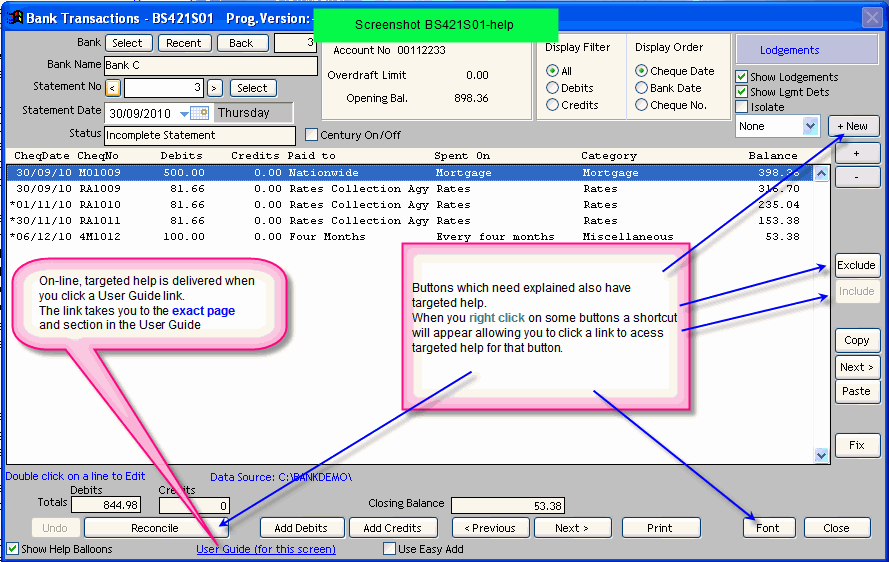
has links to the User Guide on the initial screen of each program.
Screenshot BS421S01-help
We have also provided links on
some sub-screens.
In each case the links are targeted, so you will land on the EXACT page in the User Guide where help is relevant to the screen you are working
with.
The User Guide link is normally positioned at the bottom of the screen. Heres the options:
- a) Click on the link
The program will open either the User Guide-On Line OR the User Guide-Local depending on how you have set your User Guide preference.
- b) Right Click on the link
A menu shortcut appears. Click on
User Guide-On line
OR
User Guide-Local
OR
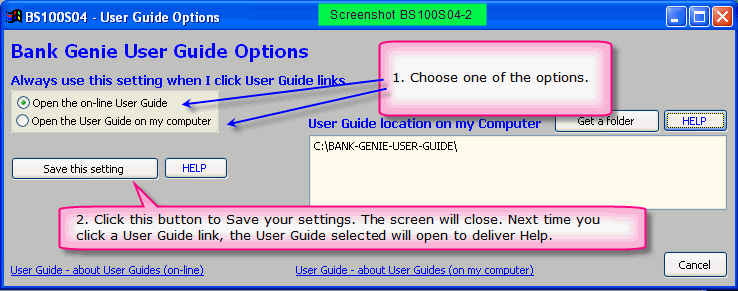
User Guide-Options
When you click User
Guide-Options, screen BS100S04 appears.
Screenshot
In that screen, you can set your preference for which User Guide to
open when you click a User Guide link.
Click the Save this setting button.
The User Guide web page may open faster if you choose the Local option.
About viewing the User Guide on our website
An Internet Connection is required.
The on-line User Guide is live and will be the
most up to date version.
If you prefer to keep your computer off-line (without an internet connection) then you should install the User Guide on your computer
(see next topic - Options 1 and 2)
About viewing the User
Guide locally (on your computer)
An Internet Connection is NOT required.
There are now a number of options for viewing a local copy of the User
Guide:-
- Using a downloaded copy of the User Guide
- Using a copy of the User Guide supplied on CD
For faster access, you can copy the User Guide from the CD onto your hard disk.
- Using the User Guide in your Dropbox folder
(Surf for information on the cloud based Dropbox)
This section on this User Guide explains all about these options
Keep your local User Guide up to date.
- If you purchased Bank Genie on CD, a copy of the User Guide is on your CD (Dec 12 onwards).
You can copy this to your own hard drive for faster access.
- If you purchased Bank Genie from a Download, the User Guide must be downloaded separately, or accessed by the Dropbox cloud method.
The User Guide may be
downloaded from the Bank Genie Product Support website
More about User Guide options and how to configure User Guide access
This section on this User Guide explains all about User Guide options and how to use and configure the LOCAL User Guide.
|